

developer · localization · feature
Translate your own game strings: CSV, JSON, PO & XLIFF localization
RuneTranslate’s Developer tab (Ultimate plan) imports your own CSV, JSON, PO (gettext) or XLIFF files, translates them into as many languages as you want at once with any provider, and exports each back in the same format with ids intact.
You wrote your game in one language. Reaching players in the others means translating every menu label, item name and line of dialogue — and keeping them in sync as your game changes. If your text already lives in CSV, JSON, PO or XLIFF files, RuneTranslate's Developer tab, part of the Ultimate plan, turns that into a few clicks: translate your own game strings by importing them, picking the languages, and getting a translated file back for each one.
This isn't the game-extraction workflow RuneTranslate is known for — you already own the strings. The Developer tab is built for exactly that: bring your own text, translate it into many languages at once, and export it back in the same format.
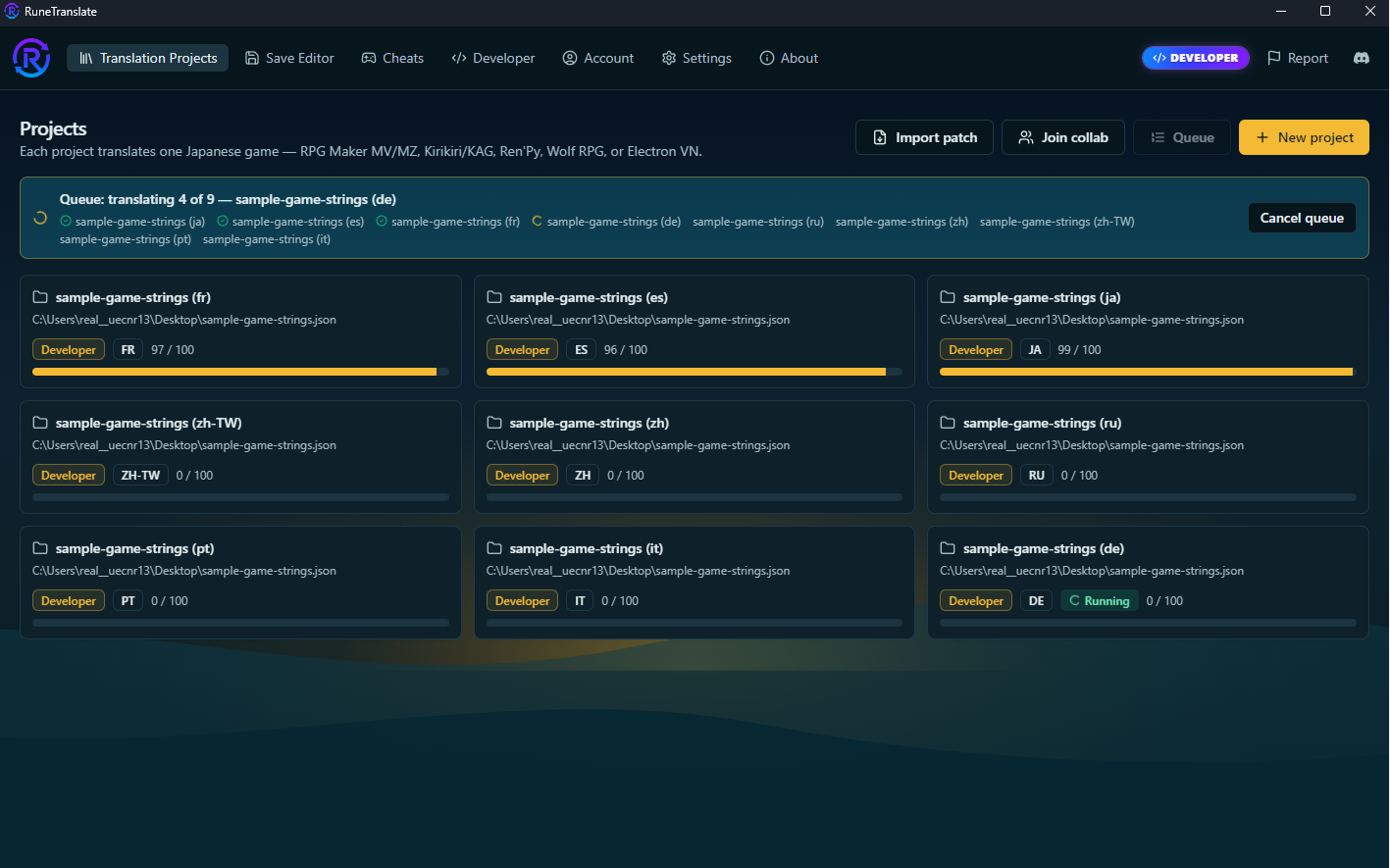
What a Developer project is
A Developer project is a normal RuneTranslate project whose source is a file from your own game or localization pipeline instead of a game folder. Import a .csv, .json, .po or .xliff and every entry becomes a translatable line. From there it behaves like any other project: it opens in the editor, translates with any provider, remembers your translation memory and glossary, and exports back to the format you started from — with your keys and ids untouched, so it drops straight back into your build.
The formats it speaks
Four interchange formats cover almost every engine and localization stack:
- CSV— Unity localization tables, Godot translation CSVs, or any string sheet from Excel or Google Sheets.
- JSON— the format behind most web and app i18n (i18next, vue-i18n, Flutter, React Native) and countless custom engines.
- PO (gettext)— the lingua franca of open-source and professional localization: gettext, Weblate, Crowdin, Poedit, Transifex.
- XLIFF— the CAT-tool standard (memoQ, Trados, Smartcat, OmegaT) that vendors and professional translators expect.
Whichever you bring, RuneTranslate reads it into the same editable line list — a Unity CSV, a gettext .po and an Unreal-exported .xliff all translate the exact same way.
One import, many languages
The part that saves the most time: you don't localize one language at a time. On import you pick a source language and as many target languages as you want, and RuneTranslate creates one project per language— each badged Developer — from that single file. Want your game in French, German, Spanish, Japanese, Korean and Simplified Chinese? Import once, tick six languages, and get six projects ready to translate.
Automatic translation, your provider
Leave Translate automatically ticked and RuneTranslate queues every language project and translates them back-to-back, unattended. Pick the provider that fits your budget:
- Free, no key— the built-in Google and DeepL engines get you a full first pass at zero cost.
- Your own API key— DeepL, OpenAI (GPT), Anthropic (Claude), DeepSeek, or any OpenAI-compatible endpoint (OpenRouter, NanoGPT) for context-aware, LLM-quality output.
- Local model— run Ollama or LM Studio for fully private, on-device translation with no per-word cost.
Ultimate is a paid tier, so translation runs at full speed, and you can chain the AI refiner for a second quality pass on every line.
Review and keep control of quality
Machine translation gets you most of the way; the editor gets you the rest. Each language project opens in RuneTranslate's normal editor, where you can read every line beside its source, lock character names and UI terms with a glossary, reuse past work with translation memory, and run the AI refiner to smooth tone and catch awkward phrasing.
Export back — same format, ready to ship
When a language is done, export it. You get a file in the same format you imported— CSV back to CSV, PO back to PO — with the original keys and ids preserved. Drop it into your game's locale folder and it just works. Because RuneTranslate matches lines by id first (then by source text), you can re-import an updated source later and only the new or changed lines need translating.
Who it's for
- Indie developers shipping in more than one language without a localization budget.
- Studios that want a fast, consistent first pass before handing off to human translators.
- Anyone with an existing pipeline— you already export
.po/.xliff/.json; this slots in between "extract" and "re-import" and does the actual translating.
How to translate your game, step by step
- Export your strings from your engine or i18n framework as CSV, JSON, PO or XLIFF.
- In RuneTranslate, open the Developer tab and click New Developer project.
- Pick your source language and every target language you want to ship.
- Choose a provider, leave Translate automatically on, and import your file.
- RuneTranslate creates one project per language and translates them all. Review each in the editor; fix names and tone with your glossary and the refiner.
- Export each language back to its file and drop it into your game.
Frequently asked questions
What file formats can I translate?
CSV, JSON, PO (gettext) and XLIFF — the formats exported by Unity, Godot, gettext, i18next and most CAT tools. You import one, translate it, and export it back in the same format.
Can I translate my game into several languages at once?
Yes. Pick a source language and any number of target languages when you import, and RuneTranslate creates one project per language and translates them all automatically.
Do I need an API key?
No. The built-in Google and DeepL engines are free and need no key. For LLM-quality output you can add your own DeepL, OpenAI, Anthropic or DeepSeek key.
Will my placeholders and format tokens survive translation?
Yes. Developer projects do not mask or rewrite your text, so tokens like {0}, %s or <b> pass straight through to the provider, which preserves them.
Does it keep my keys and ids?
Every export preserves the original ids, so the translated file drops straight back into your game. Re-importing an updated source only translates the new or changed lines, matched by id and then by source text.
Is machine translation good enough to ship?
It gets you a strong first pass. The editor then lets you review every line, lock terminology with a glossary, reuse past work with translation memory, and run an AI refiner before you ship.
What game engines does it work with?
Any engine — the interchange formats are engine-agnostic. Unity, Unreal, Godot, a custom engine, or anything with a gettext or i18n pipeline.
Pricing
The Developer tab is part of the Ultimate tier, $9.99 a month on Patreon. It includes everything in Pro — full-speed translation, translation memory, provider routing, the glossary, the unattended batch queue and image-text OCR — plus Developer projects, the largest RuneLingua allowance and a 100-project limit. Every engine RuneTranslate supports is unlocked on every tier; Ultimate adds the bring-your-own-strings workflow on top.
Download RuneTranslate, open the Developer tab, and turn one string file into a shelf full of languages.
Related reading
Ready to try RuneTranslate?
Free tier unlocks every engine + every translation provider. Supporter ($3.99/mo) unlocks full speed.
Download for Windows & Linux